Showing posts with label Windows. Show all posts

Sunday, September 16, 2012

Instalasi Windows 8

Windows 8 adalah nama kode untuk versi selanjutnya dari Microsoft Windows, serangkaian sistem operasi yang diproduksi oleh Microsoft untuk digunakan pada komputer pribadi, termasuk rumah dan bisnis, laptop,netbook,tablet,server dan pusat media data.Microsof secara resmi akan mengumumkan jadwal perilisan sistem operasi terbaru ini pada tanggal 26 oktober 2012, bersamaan dengan peluncuran komputer perdana yang menggunakan windows 8.

Saturday, September 8, 2012

How (and Why) to Partition Your Hard Drive

Disk partitioning--separating one physical hard drive into multiple independent volumes--can relieve all sorts of computer-related headaches, and thanks to the Disk Management tool included with Windows 7 and Vista, you can perform the task without expensive third-party software. Here's how to use Disk Management to make the most of your hard drive.

Why Partitioning Your Hard Drive Makes Sense

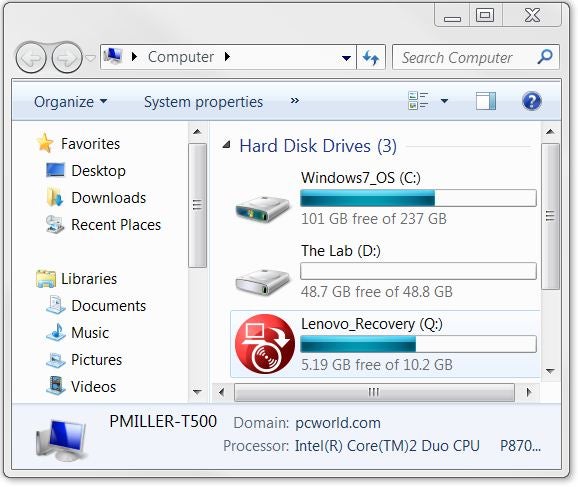
Most PCs come from the factory with a single partition on their hard drive, meaning that it shows up as one drive in the Computer window (as C:, typically). But keeping your data, applications, and operating system on the same partition can be risky because, if something happens to the partition's index file (the file that tells your computer where the various pieces of your data are located), your computer won't be able to boot up off that drive--and even if you boot up with a recovery disc or external drive, you won't be able to access the rest of your data.
One drive, three partitions; click for full-size image. 

How to Download and Install Windows 8 Into a Virtual Machine

We've shown you how to go about installing the new Windows 8 developer preview on a brand-new hard drive or a partition of your existing hard drive--that's easy.

However, most of you probably just want to check out Windows 8 without making a commitment to installing the OS on its own separate drive (or drive portion). No problem! You can still fiddle with the new OS in an environment that's much easier to remove once tinkering time ends, thanks to the power of virtual machines--applications that let you run a virtual PC inside your PC (cue Inception music).

How to Download and Install Windows 8 on a New Partition

So you want to try out Windows 8. Excellent! But you're not foolhardy enough to try using a developer preview build as your main work/play operating system--you just want to dabble. We'll show you how to download and install the Windows 8 developer's preview onto a separate partition (or separate hard drive, if you have a spare). If you don't feel like mucking your hard drive with another partition, read How to Download and Install Windows 8 to a Virtual Machine for a less-intrusive way to get Windows 8 up and running on your PC.

Install Windows XP From USB Drive Part-II


I previously wrote an article Install Windows XP from USB Flash/Pen Drive part-I. This process allows you make a USB flash disk/drive bootable and exactly the same as the XP installation CD. To make the whole process you should have a PC/Computer/Laptop with CD/DVD Rom. Once you make your USB drive ready to boot windows  XP setup from it then you can start Installing Windows XP from that USB Disk/drive in any computer.

Also read how to Install Any Software You need In Your USB Flash Drive With Mojopac.
I shall describe the process how to make the USB drive ready to install XP in your computer step by step.
Requirements:
1. At first you have to get a USB flash drive/disk(at least 1 GB).
2. XP_FROM_USB.rar from the given link below:
Download link
Update: You should have XP installed computer for this process.


Windows 7 Installation Guide


The Windows 7 is finally here. It's released for beta testers a few days ago and I am here with a small step by step picture guided tour through the installation process. I downloaded the x86 version of the M3 build ( build No: 6801) from Microsoft Connect site, which is 2.72 GB ISO. The x64 version is around 3.2 GB in size.

The installation process was just like vista setup and to my surprise completed in just around 20 minutes in my low end Virtual hardware. This surely indicates the performance improvements Microsoft has put on this windows vista replacement.

Rating Histats

Kategori Berita